
A detailed resource for strata accountants on BAS preparation, GST corrections and BAS Clearing reconciliation in Property IQ.
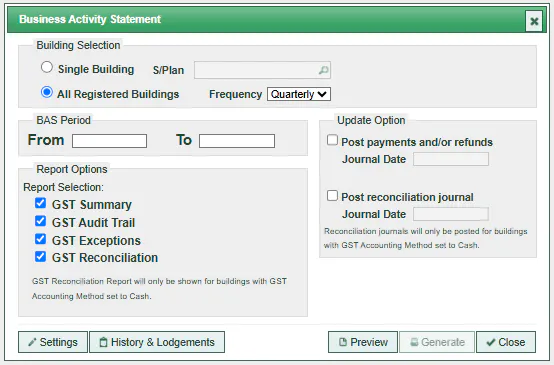
This guide explains the recommended steps strata accountants should complete before sending BAS reports to a BAS agent, how to correct GST anomalies in Property IQ, and the different methods available to clear GST after BAS lodgement. It also outlines why journal entries provide the strongest audit trail and how BAS Clearing works inside Property IQ.
Strata accountants should complete a full first review of the BAS period before anything is sent to the BAS agent. This includes:
Any anomalies identified at this stage should be corrected directly in Property IQ.
Once the first review is complete, the BAS agent acts as the second set of eyes before the BAS is lodged with the ATO. Their review provides an additional safeguard to ensure GST accuracy across the BAS period. After lodgement, the BAS agent provides the BAS Lodgement Confirmation to the strata manager or strata accountant. This confirmation shows the final GST payable or refundable outcome for the BAS period.
Once the BAS agent has lodged the BAS and provided the BAS Lodgement Confirmation, the strata accountant can begin the internal accounting steps required to record the BAS outcome in Property IQ. This is where the BAS Clearing account becomes important. BAS Clearing is used to recognise the GST payable or refundable for the BAS period and ensures the scheme’s GST balances remain accurate before any payments or refunds are processed.
If anomalies exist for expense items, correct the GST by opening the specific supplier transaction, editing the GST and saving the transaction. You can also use Adjustments → Supplier Transactions to identify invoices missing GST for GST‑registered ABNs.
These corrections are only possible if the transaction is in the current financial year. If the financial year has rolled, corrections must be made using a journal entry.
For income anomalies, use Adjustment → Levy Adjustment to correct GST for current‑year income transactions. Corrections for previous‑year income after rollover must be done using a journal entry.
Frequent mistakes include:
Check and update the GST registration of suppliers immediately when adding new suppliers and before entering invoices. Review the GST registration of all suppliers every year or whenever there is a change in ownership or company structure. This step is compulsory and saves significant time later by reducing GST corrections prior to BAS lodgement.
Pay attention to the GST total on supplier invoices and ensure GST in Property IQ matches the supplier invoice. Accurate data entry means fewer corrections during BAS lodgement.
Before performing the scheme's End of Year process, preview the BAS report, check GST Exceptions for both income and expenses and make any necessary corrections. Corrections for previous‑year transactions after the financial year is rolled can only be done by journal entry. Extra time spent checking before rollover reduces the need for correction journals during BAS lodgement.
The BAS Clearing Account is a temporary liability account used to offset tax and PAYG liabilities against payments to or refunds from the Australian Taxation Office. The account must be reconciled and cleared each time after BAS is lodged and payments are made or refunds are received.
Because BAS Clearing is a liability account:
Once the BAS is lodged, the next step is to clear GST for the BAS period. Property IQ allows three methods:
Creating a journal entry is the recommended method for clearing GST in Property IQ. Although it may take more time, it provides a clear and reliable source for reconciliation if anomalies surface later. It is also easy to edit and correct when required, provided the journal entry is in the same financial year. Using journal entries gives full visibility of when the BAS clearing work was completed and up to which BAS period or quarter the GST has been reconciled.
Most anomalies occur when a strata manager changes an expense item from Admin to Reserve or vice versa, or changes the expense code without updating the GST value. A journal entry makes these issues easier to identify and correct.
Using Supplier Transactions or Adjustments requires knowing whether the BAS period ends with a payable or a refundable. This makes reviewing past BAS periods more difficult because you must search for ATO payments in Supplier Transactions or check Adjustments for refunds. These methods work, but they do not provide the same convenience or ease of searching and correction as a journal entry.
Using Property IQ Automated BAS Clearing is convenient but not perfect because BAS lodgements are rounded to whole dollars while Property IQ uses exact cents. This requires additional corrections to avoid unreconciled BAS Clearing balances.
Ensure the net figures or outcome entered in Property IQ match the payables or refunds shown in the BAS Lodgement Summary or Confirmation from your BAS agent.
Use the following structure (line by line):
Debit GST Collected – Admin
Credit BAS Clearing Account – Admin
Debit GST Collected – Reserve
Credit BAS Clearing Account – Reserve
Debit BAS Clearing Account – Admin
Credit GST Paid – Admin
Debit BAS Clearing Account – Reserve
Credit GST Paid – Reserve
Debit PAYG Instalment (Admin or Reserve)
Credit BAS Clearing Account (Admin or Reserve)
All above Admin and Reserve GST entries, along with PAYG Instalments if any, can be processed in one journal as long as they belong to the same schedule.
Prepare separate journal entries for each schedule, using the same structure.
The difference between GST Collected and GST Paid determines whether BAS Clearing is positive or negative. After entering the journal, check if the net outcome correctly matches the BAS Lodgement Summary or Confirmation.
After the journal entry is added in Adjustment, upload the BAS Lodgement Confirmation in Supplier Transactions, enter the Admin or Reserve amount and code the amount to BAS Clearing. Once saved, the BAS Clearing account will become zero even if payment has not yet been made to the ATO.
Wait to receive ATO refund and code to BAS Clearing, splitting between Admin and Reserve.
Quick tip: Go to Building Card → Financials → Trial Balance and scroll to BAS Clearing to reveal the split amounts between Admin & Reserve, and between schedules if more than one.
Journal entries should be used when:
These situations require a clear audit trail and precise adjustments, which journal entries provide.
Maintaining reconciled GST accounts and a reconciled BAS Clearing account in Property IQ is essential for accurate financial reporting and smooth BAS lodgement. By following the recommended review steps, correcting anomalies promptly and using journal entries as your primary method for clearing GST, strata accountants can ensure each BAS period is fully reconciled and easy to audit. Consistent processes reduce transition risk, support compliance and provide clarity for both managers and committees.